Removing thumbs.db file from explorer might take time. So you may also try the command interface.
- Press Windows Key + R for Run window, type cmd for opening command prompt
- del /s /ah thumbs.db
This command will quickly remove thumbs.db files from your computer.
How to prevent thumbs.db file from getting recreated?
The above method only can help you in removing the created thumbs.db file, but it can’t prevent creation of newer thumbs.db files. If you have plenty of photos in your PC, these files will get regenerated easily and start consuming hard disk space.
To prevent this file from getting generated, try this tweak.
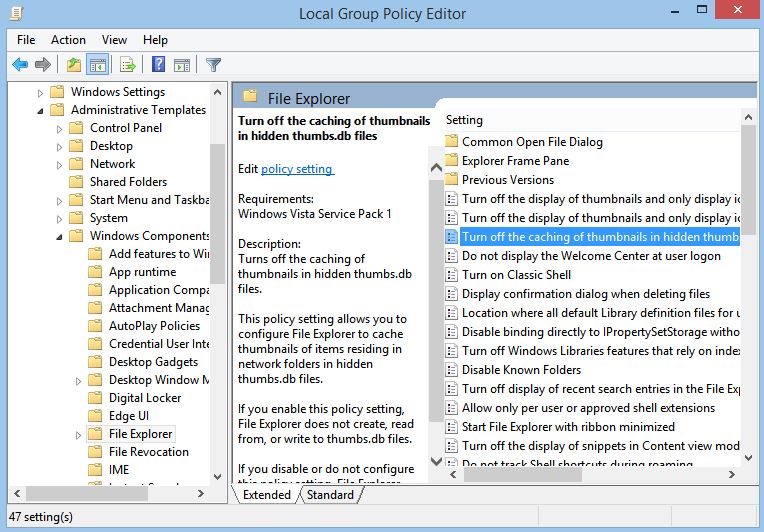
- Press Windows key + R for opening Run window. Type gpedit.msc and hit Enter
Note: Group Policy Editor is a feature included with premium versions of Windows mainly the professional and enterprise edition. So if you don’t get any window opened after typing gpedit.msc, the version of windows in your PC may not support that feature. - On the left side of Group Policy Editor window, open User Configuration -> Administrative Templates -> Windows Components -> File Explorer (Windows Explorer in 7, File explorer in Windows 8). On the right side double click on “Turn off the caching of thumbnails in hidden thumbs.db filesâ€. Click Enabled. Click OK
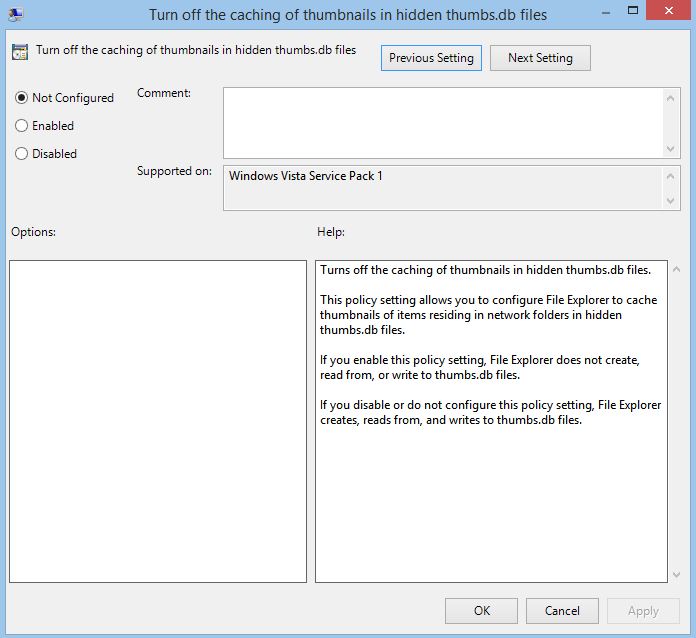
Once the step is done, no more thumbs.db files will be generated in your computer.