
Linux: CentOS 6 kernel panic+0xa7/0x16f fix

So ran into a view issue for a Linux Host today. Kernel Panic !!!
There could be a number of reasons that you might get this error. The three common reasons may be:
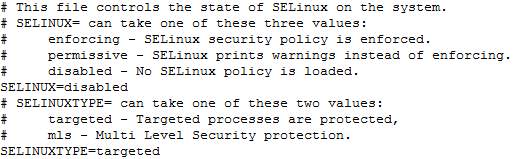
- There was a change to selinux config – (that might be an error in the config file)
- There are disk errors
- The kernel is corrupted
None of the kernels in the GRUB boot menu will boot, you get a kernel panic:
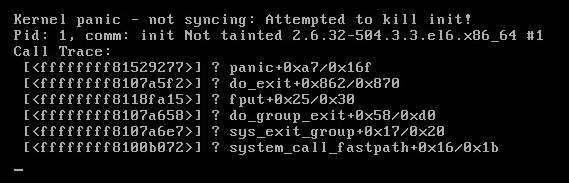
Kernel panic – not syncing: Attempted to kill init!
Pid: 1, comm: init Not tainted 2.6.32-504.3.3.el6.x86_64 #1
panic+0xa7/0x16f
do_exit+0x862/0x870
fput+0x25/0x30
do_group_exit+0x58/0xd0
sys_exit_group+0x17/0x20
system_call_fastpath+0x16/0x1b
Booting in single user mode doesn’t work either.
Here’s how to fix this:
- Reboot, and go in the GRUB menu. You have 3 seconds to strike the arrow keys before it will automatically boot the default kernel.
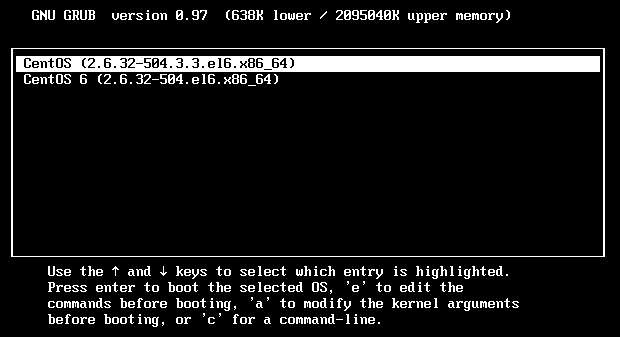
- Select the first line, the default kernel, and press the E key on the keyboard to edit the parameters. You will then see the following.
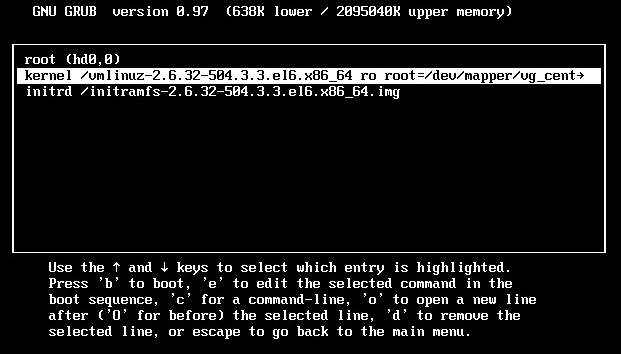
- Use the arrow keys to select the 2nd line, that starts with kernel. Press the E key to change this line, use the arrow keys to go to the end and type a space followed by enforcing=0
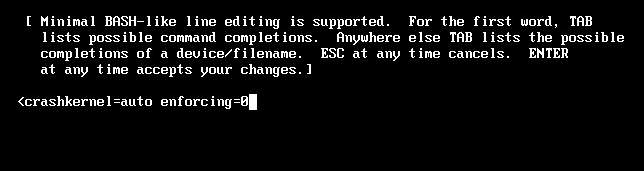
- Press enter to conform and then press B to boot the system.
It should boot up fine now. - Reboot.
Choose your solution:
[su_tabs vertical=”yes”]
[su_tab title=”SELINUX Config File”]
Disabled for the SELINUXTYPE variable, that’s wrong it has to be for the SELINUX variable. In the screenshot below I show you the correct settings in the config file to disable SELINUX.
[/su_tab]
[su_tab title=”Disk Errors”]
fsck -a /dev/sda1
[/su_tab]
[su_tab title=”Rebuild Kernel”]
yum remove kernel
yum-complete-transaction
yum update
[/su_tab]
[/su_tabs]