What actually changed?
Azure Roadmap item 576242 puts a feature called Disable VNet peering route (DPR) into public preview. It’s a route-table capability: you flag a subnet and Azure stops installing the system-generated peering routes, the ones that point at the peered VNet’s address space, on that subnet’s effective route table.
That’s it. One switch. But it closes a gap that’s been open since VNet peering shipped. If you run hub-and-spoke, you’ve been papering over it with NSGs and NVAs for years.
What did peering do before, and why was that a problem?
When you peer VNet A to VNet B, Azure injects system routes for B’s entire address space onto every subnet in A. Automatically. No opt-out. The route table says “B’s prefixes → VNetPeering next hop,” and it says it on your front-end subnet, your database subnet, and the subnet you forgot you provisioned in 2022.
Peering reachability was all-or-nothing at the VNet boundary. If any subnet in A needed to talk to B, every subnet in A got a route to B. You could block the traffic afterward with NSGs or force it through a firewall with UDRs, but the route was always there, propagated, waiting. The segmentation lived in your filtering layer, not your routing layer, and those two drift apart the moment someone edits an NSG at 2am.
Is this a firewall? Does it replace my NSGs?
No. Burn this into your head before you deploy it: DPR controls route propagation, not packet filtering. It decides whether a subnet knows how to reach the peer, not whether a packet is allowed to. There is no port, no protocol, no stateful inspection, no logging of denied flows.
If a subnet has no route to B’s prefixes and no other path that resolves them, traffic to B is simply dropped as unroutable, silently, at layer 3. That’s a different failure mode from an NSG deny, and it logs nowhere useful. Keep your NSGs. Keep Azure Firewall if you’re inspecting east-west. DPR sits under them: it removes the road, it doesn’t staff the checkpoint.
How does it actually work?
It’s a property on a route table. You associate the route table with the subnet you want to isolate, enable the “disable peering routes” setting, and Azure stops programming the peering system routes onto that subnet’s effective routes. Subnets without the flag keep behaving exactly as they do today.
The mechanism matters: this is the same place you already define User-Defined Routes. A UDR has always been able to override a system route with a more specific prefix. What a UDR couldn’t do was make the broad peering route disappear, it was still there as a fallback. DPR removes it from the table entirely.
Walk me through the scenario.
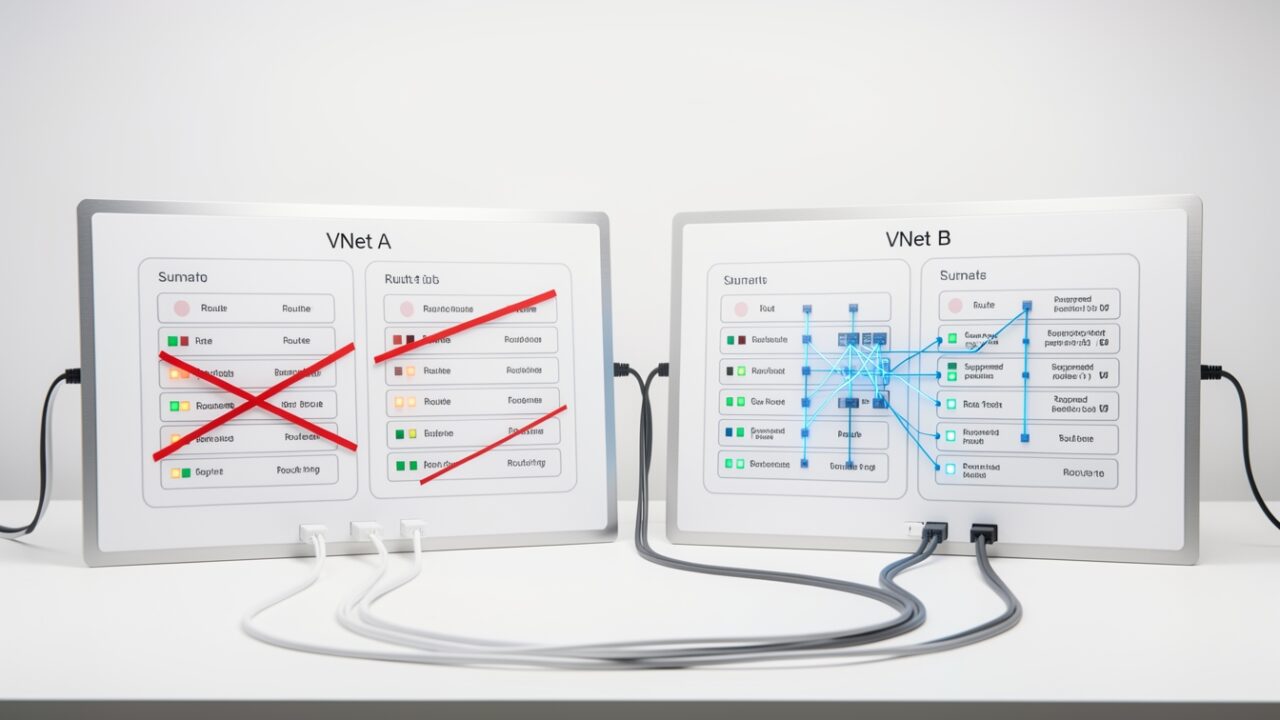
VNet A (hub-facing) is peered to VNet B, which holds a bunch of Private Endpoints. Subnet1 in A runs an app that legitimately needs those endpoints. Subnet2 in A is your high-security workload, it should have no business reaching B at all.
Before DPR: both subnets got the route to B’s address space. Subnet2’s isolation depended entirely on an NSG rule nobody double-checks.
After DPR: you attach a route table to Subnet2 with peering-route suppression on. Subnet1 is untouched and still reaches the Private Endpoints. Subnet2 loses the route to B’s prefixes and can no longer resolve a path there.
Deploy it in plan mode first. Always:
I’m not going to hand you a live az network route-table update with a confident flag name, because the preview parameter isn’t something I’ll invent. The association step, route table to subnet, is stable and the pattern above is correct. The suppression property itself: read the 576242 preview documentation and copy the exact name from there.
Does this give me clean asymmetric reachability, A→B blocked, B→A still fine?
This is where people get hurt. The honest answer is: not for anything stateful, not without a return path.
Suppressing the peering route on Subnet2 removes Subnet2’s route to B. But most useful traffic is a conversation. If B initiates a connection to a host in Subnet2, the SYN arrives fine, B still has its route to A. The SYN-ACK has to go back to B, and Subnet2 now has no route to B’s prefix. The return packet is dropped. The handshake never completes. You’ve built a one-way door into a wall.
So “B can still reach A” only holds if Subnet2 has an alternative route that resolves B, typically a default route (0.0.0.0/0) pointing at a firewall or NVA that can forward to B. At which point your firewall, not DPR, owns the policy. DPR genuinely gives you clean one-way isolation (Subnet2 can’t start anything toward B and nothing from B completes). It does not give you clean one-way connectivity. Those are not the same thing, and the roadmap language blurs them.
What’s the blast radius when I turn it on?
Scoped to the subnets whose route table has the flag set. Other subnets in the same VNet keep their peering routes. But the moment you associate that route table, every existing flow from that subnet to the peer’s address space stops routing. If something in that “high-security” subnet was quietly depending on a path into B, a monitoring agent, a backup job, a DNS forwarder sitting in the peer, it breaks immediately and without a log line.
Inventory the subnet’s active destinations before you flip it. Pull NSG flow logs or VNet flow logs for traffic to the peer’s prefixes over a representative window. If the subnet is talking to B today and you can’t explain why, find out before DPR tells you the hard way.
Is it GA? Which regions? Any limits?
Public preview per the roadmap, not GA. Treat it as preview means: no production SLA, behaviour and property names can change, and you should not build a compliance control on it yet. The roadmap entry is the source of truth for regional availability and timing; I won’t put a region list or a GA date in your mouth that Microsoft hasn’t committed to. Validate availability in your target regions in the portal before you plan around it.
Is this the same as disabling BGP route propagation?
No, and don’t let the UI proximity fool you. The existing disableBgpRoutePropagation setting on a route table affects routes learned over ExpressRoute/VPN gateways via BGP. DPR targets the system-generated peering routes, a different source, a different layer. They live near each other on the same object. They do different jobs. Setting one does nothing for the other.
So what bites me in six months?
Three things. The asymmetric-routing trap above, someone enables DPR expecting a one-way allow and gets a broken handshake instead. Silent drops, DPR failures produce no deny event, so an outage looks like an application bug for the first hour of the incident. And drift, because the control now lives in the routing layer and your NSGs still exist, you have two segmentation models to keep honest, and the day they disagree is the day of the audit.
Peering reachability stopped being a VNet-wide verdict. That’s a real win for micro-segmentation. Just remember you’ve been handed a scalpel, not a shield, it cuts the route, it doesn’t inspect the packet, and it won’t tell you when it bleeds.