
Admins often need to automate things, like creating a dedicated account for joining machines to an Active Directory (AD) domain. Â This is useful for things like System Center Configuration Manger task sequences and System Center Virtual Machine Manager templates or similar needs.
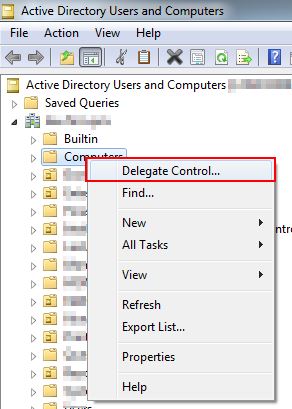
First create a standard Windows user account. Â Next, right-click on the Computers Organization Unit (OU) within your AD domain. Â From the menu choose Delegate Control.
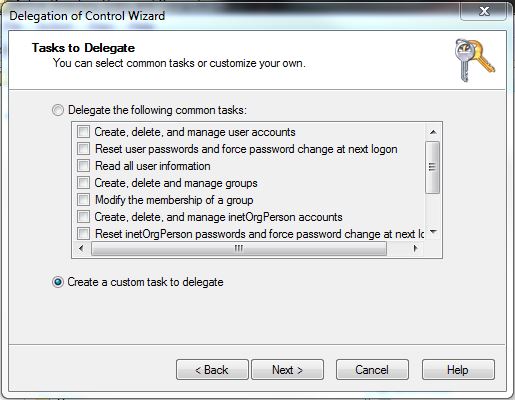
On the next screen (Users or Groups) choose Add and select the user account you just created.  Click Next.  Choose “Create a custom task to delegate†on the next screen.
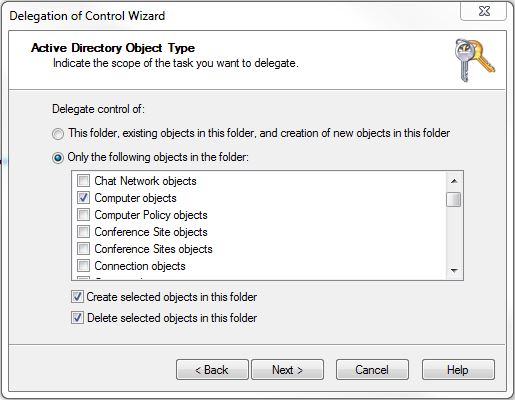
Next, choose to only delegate control to computer objects and tick Create and Delete selected objects in this folder. Â Click Next.
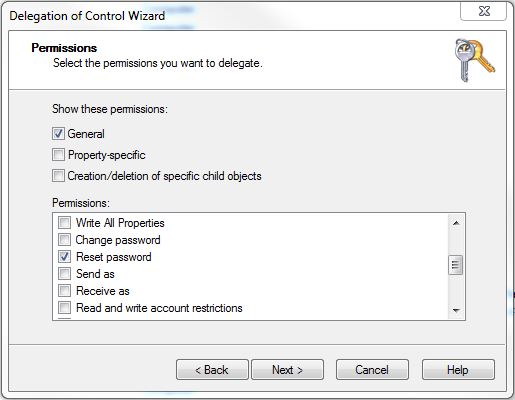
On the next screen choose to show general permissions and from the list select:
- Reset password
- Read and write account restrictions
- Validated write to DNS host name
- Validated write to service principal name
Click Next and finish to complete the wizard.  Repeat this process for any other OUs where you’ll be joining computers to the domain.
Author

Related Posts

Get all the domains controllers in the AD forest along with their current FSMO roles
In a large enterprise an admin would need to keep track of all the domains in a AD forest, the domain names,...
Read out all
Force synchronization for DFSR-replicated SYSVOL
One of my clients had a problem with processing GPO on client computers. Different computers applied different settings from the same GPO...

Get Inactive Users Report for the past 60 days in a multi domain environment
I had a request recently to provide an inactive user report for the past 60 days. Basically, find out which accounts have...

Get Primary, Secondary, Tertiary DNS values and more from Multiple Servers
Came across a unique request to get primary, secondary, and tertiary DNS values for multiple computers/servers across the domain. I started writing...

Fix Active Directory broken security inheritance problem
Ran into a situation at a client location where in Active Directory, the security permissions applied to an OU were not getting...

How to Fix: Attribute userAccountControl of DC is: 0x82020
When running a DCDiag at a customer site today I had the following error occur: [su_box title=”” box_color=”#f3f1cb” title_color=”#000000″ radius=”6″]Warning: Attribute userAccountControl...