WARNING: This is for education/informational testing/development purposes only, and should not be used on a production server.
WARNING: This trick will only work with an ESX(i) stand alone server. It will not work if the ESX(i) server is connected to a vCenter Server, as the vCenter Server knows better than to let you do this. (you can always remove and readd the ESX(i) server to vCenter.)
To reset your ESX 4.x, ESXi 4.x and ESXi 5.x 60 day evaluation license:
- Login to the TSM through SSH or Shell
- Remove the following two files:
-
/etc/vmware/vmware.lic
-
/etc/vmware/license.cfg
-
- Reboot server
If your ESX server is connected to a vCenter server, please remove the ESX server first. Once the steps above are completed, you can add it back to the vCenter server.
Command to remove the license and reboot the ESX host:
rm -f /etc/vmware/vmware.lic /etc/vmware/license.cfg
reboot
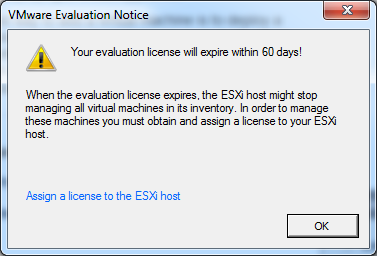
After reboot, logging on the ESXi server, you should be greeted with this message.
For ESXi 5.1 and ESXi 5.5, you may need to continually remove the license files as the server reboots for this to work. The following should do this quite nicely:
rm -f /etc/vmware/vmware.lic /etc/vmware/license.cfg
reboot ; while true ; do
    rm -f /etc/vmware/vmware.lic /etc/vmware/license.cfg
done
An alternative would be restarting the services, it should work just as well as rebooting the server:
# For ESXi 5.0
rm -f /etc/vmware/vmware.lic /etc/vmware/license.cfg
services.sh restart
# For ESXi 5.1
rm -r /etc/vmware/license.cfg
cp /etc/vmware/.#license.cfg /etc/vmware/license.cfg
/etc/init.d/vpxa restart
For vCenter
1) Create a DSN to your local SQL Express instance that holds your vCenter DB.
2) Uninstall virtual center
3) Re-install virtual center and point to your DSN making sure not to overwrite.
With this method, I have been able to refresh my 4.1 and 5.0 hosts. Have not confirmed if this works for 5.1.
Author

Related Posts

Get all the domains controllers in the AD forest along with their current FSMO roles
In a large enterprise an admin would need to keep track of all the domains in a AD forest, the domain names,...
Read out all
Force synchronization for DFSR-replicated SYSVOL
One of my clients had a problem with processing GPO on client computers. Different computers applied different settings from the same GPO...

Get Inactive Users Report for the past 60 days in a multi domain environment
I had a request recently to provide an inactive user report for the past 60 days. Basically, find out which accounts have...

Get Primary, Secondary, Tertiary DNS values and more from Multiple Servers
Came across a unique request to get primary, secondary, and tertiary DNS values for multiple computers/servers across the domain. I started writing...

Fix Active Directory broken security inheritance problem
Ran into a situation at a client location where in Active Directory, the security permissions applied to an OU were not getting...

How to Fix: Attribute userAccountControl of DC is: 0x82020
When running a DCDiag at a customer site today I had the following error occur: [su_box title=”” box_color=”#f3f1cb” title_color=”#000000″ radius=”6″]Warning: Attribute userAccountControl...