So had a request today to clean up email addresses as some of them were not valid. This was needed for over 1500 email addresses.
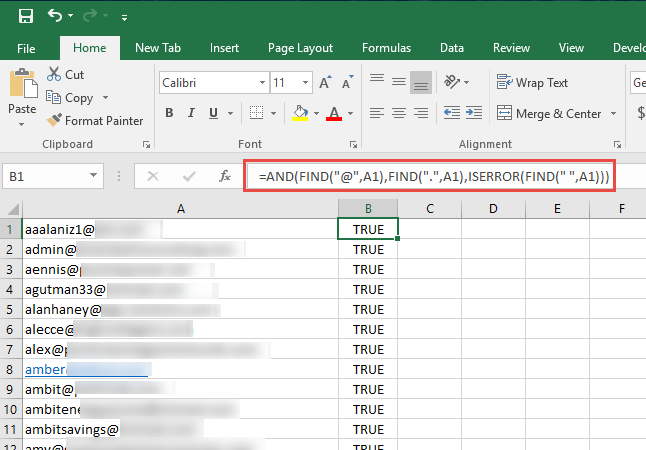
So used the formula below and was able to find all addresses that were “FALSE”. I filtered them out and was able to fix them as needed.
Here’s what you need to do:
If your e-mails are in A column, go in the B column and in the B1 cell and copy paste this code:
=AND(FIND("@";B2);FIND(".";B2);ISERROR(FIND(" ";B2)))
Then, go down and left on the B1 cell so you can copy and paste the code to the other cells. Â For all the valid e-mails, it will give you ‘TRUE’ and for the invalid ‘FALSE’.
Author

Related Posts

Get all the domains controllers in the AD forest along with their current FSMO roles
In a large enterprise an admin would need to keep track of all the domains in a AD forest, the domain names,...
Read out all
Force synchronization for DFSR-replicated SYSVOL
One of my clients had a problem with processing GPO on client computers. Different computers applied different settings from the same GPO...

Get Inactive Users Report for the past 60 days in a multi domain environment
I had a request recently to provide an inactive user report for the past 60 days. Basically, find out which accounts have...

Get Primary, Secondary, Tertiary DNS values and more from Multiple Servers
Came across a unique request to get primary, secondary, and tertiary DNS values for multiple computers/servers across the domain. I started writing...

Fix Active Directory broken security inheritance problem
Ran into a situation at a client location where in Active Directory, the security permissions applied to an OU were not getting...

How to Fix: Attribute userAccountControl of DC is: 0x82020
When running a DCDiag at a customer site today I had the following error occur: [su_box title=”” box_color=”#f3f1cb” title_color=”#000000″ radius=”6″]Warning: Attribute userAccountControl...