
Working with many app/dev teams it is hard to find which version of Dot Net an application was designed or made in.
Now if your application server has multiple drives and depending on which drive the application resides it may be hard to find this information.
Let’s assume there are two drives C: and D:.
We will start with D: drive as it is easy.
#Check DotNet Framework for .EXE & .DLL
#====================================#
#====================================#

#Files residing on any other drive except C: (OS Drive)
#=====================================================#

#Uncomment the line below to surpress any errors
#$ErrorActionPreference = "SilentlyContinue"

#Specifiy the filepath (I am using the root)
$filepath=’D:\’

#Get All files and filter .exe and .dll files
$files=Get-ChildItem -Path $filepath -Recurse -include *.dll,*.exe

#Loop through each file
foreach($file in $files)
{
    #Check the version of .NET for the file
    $version = [System.Reflection.Assembly]::ReflectionOnlyLoadFrom($file.FullName).ImageRuntimeVersion;

    #Write the Output on Screen + Capture to a file
    Write-Output "$file,$version" | Out-File D:\DotNetFiles_D.txt -Append

}
Now the C: drive is a little more work. The above method wont work because C:Â drive has system files and depending on your rights you may not have access to them.
You may get the following error:

But there is a way we can get this accomplished. Good old dos commands to the rescue! We are basically going to get a list of .exe and .dll files from the C: drive and then run the above code against it.
Lets capture the files:
#For files residing on C: (OS Drive)
#====================================#
#Get a list of .exe files on the C: Drive and store to a file
dir C:\*.exe /s /b | findstr /e .exe > C_Executable_Paths.txt

#Get a list of .dll files on the C: Drive and store to a file
dir C:\*.dll /s /b | findstr /e .dll > C_DLL_Paths.txt
Now we have the .EXE files stored in C_EXE_Paths.txt and we query it for .NET versions and save the output to DotNetFiles_C_EXE.txt
#Query each .EXE file capture in C_Executable_Paths.txt
$files=Get-Content D:\C_Executable_Paths.txt

#Looping through each file entry
foreach($file in $files)

{

    #Getting .NET version number for each file
    $version = [System.Reflection.Assembly]::ReflectionOnlyLoadFrom($file).ImageRuntimeVersion;

    #Writing output to an external file
    Write-Output "$file,$version" | Out-File D:\DotNetFiles_C_EXE.txt -Append

}
Similarly we have the .DLLfiles stored in C_DLL_Paths.txt and we query it for .NET versions and save the output to DotNetFiles_C_DLL.txt
#Query each .DLL file capture in C_DLL_Paths.txt
$files=Get-Content D:\C_DLL_Paths.txt

#Looping through each file entry
foreach($file in $files)

{

    #Getting .NET version number for each file
    $version = [System.Reflection.Assembly]::ReflectionOnlyLoadFrom($file).ImageRuntimeVersion;

    #Writing output to an external file
    Write-Output "$file,$version" | Out-File D:\DotNetFiles_C_DLL.txt -Append

}
You might get errors for files that do not meet criteria or fails to list .Net version.

This can be surpressed by using:
$ErrorActionPreference = "SilentlyContinue"
The output would be similar to:
C:\Program Files\IBM\SQLLIB\BIN\db2dascmn.dll,v4.0.30319
C:\Program Files\IBM\SQLLIB\BIN\db2dascmn64.dll,v4.0.30319
C:\Program Files\IBM\SQLLIB\BIN\db2daskrb.dll,v4.0.30319
C:\Program Files\IBM\SQLLIB\BIN\db2daskrb64.dll,v4.0.30319
C:\Program Files\IBM\SQLLIB\BIN\db2daswrap.dll,v4.0.30319
C:\Program Files\IBM\SQLLIB\BIN\db2daswrap64.dll,v4.0.30319
C:\Program Files\IBM\SQLLIB\BIN\db2g11n.dll,v4.0.30319
C:\Program Files\IBM\SQLLIB\BIN\db2g11n64.dll,v4.0.30319
C:\Program Files\IBM\SQLLIB\BIN\db2genreg.dll,v4.0.30319
C:\Program Files\IBM\SQLLIB\BIN\db2genreg64.dll,v4.0.30319
C:\Program Files\IBM\SQLLIB\BIN\db2hrec.dll,v4.0.30319
C:\Program Files\IBM\SQLLIB\BIN\db2ica.dll,v4.0.30319
C:\Program Files\IBM\SQLLIB\BIN\db2ica64.dll,v4.0.30319
C:\Program Files\IBM\SQLLIB\BIN\db2install.dll,v4.0.30319
C:\Program Files\IBM\SQLLIB\BIN\db2install64.dll,v4.0.30319
C:\Program Files\IBM\SQLLIB\BIN\db2isys.dll,v4.0.30319
C:\Program Files\IBM\SQLLIB\BIN\db2jcct2.dll,v4.0.30319
C:\Program Files\IBM\SQLLIB\BIN\db2jdbc.dll,v4.0.30319
C:\Program Files\IBM\SQLLIB\BIN\db2jdbc64.dll,v4.0.30319
C:\Program Files\IBM\SQLLIB\BIN\db2kbc.dll,v4.0.30319
C:\Program Files\IBM\SQLLIB\BIN\db2kbc64.dll,v4.0.30319
C:\Program Files\IBM\SQLLIB\BIN\db2ldap.dll,v4.0.30319
C:\Program Files\IBM\SQLLIB\BIN\db2ldap64.dll,v4.0.30319
Now you can import this in Excel and go crazy! 😉
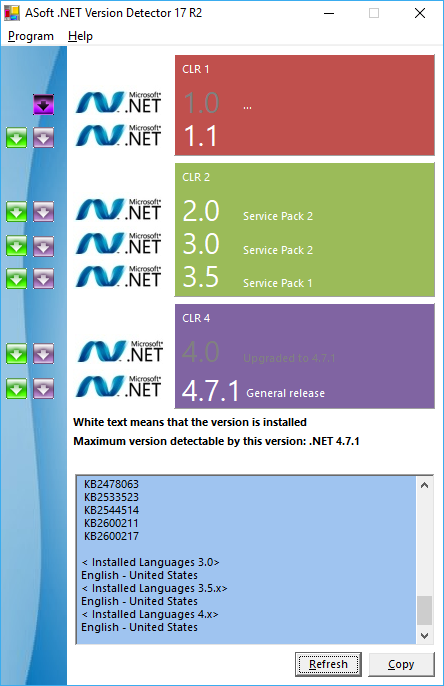
Additionally, if you want to detect what version of .NETis installed on your server here is a cool utility (ASoft .NET Version Detector) to get you the info, as well as download links to the installer in case you need to download and install.
Author

Related Posts

Adding an Application Registration\ Service Principal to another Application Registration\ Service Principal
Typically when working with App Roles in Azure Active Directory for a single application registration or service principal and then self consuming...
Read out all
Get all the domains controllers in the AD forest along with their current FSMO roles
In a large enterprise an admin would need to keep track of all the domains in a AD forest, the domain names,...
Read out all
Force synchronization for DFSR-replicated SYSVOL
One of my clients had a problem with processing GPO on client computers. Different computers applied different settings from the same GPO...

Get Inactive Users Report for the past 60 days in a multi domain environment
I had a request recently to provide an inactive user report for the past 60 days. Basically, find out which accounts have...

Get Primary, Secondary, Tertiary DNS values and more from Multiple Servers
Came across a unique request to get primary, secondary, and tertiary DNS values for multiple computers/servers across the domain. I started writing...

Fix Active Directory broken security inheritance problem
Ran into a situation at a client location where in Active Directory, the security permissions applied to an OU were not getting...